January 17th, 2024
New
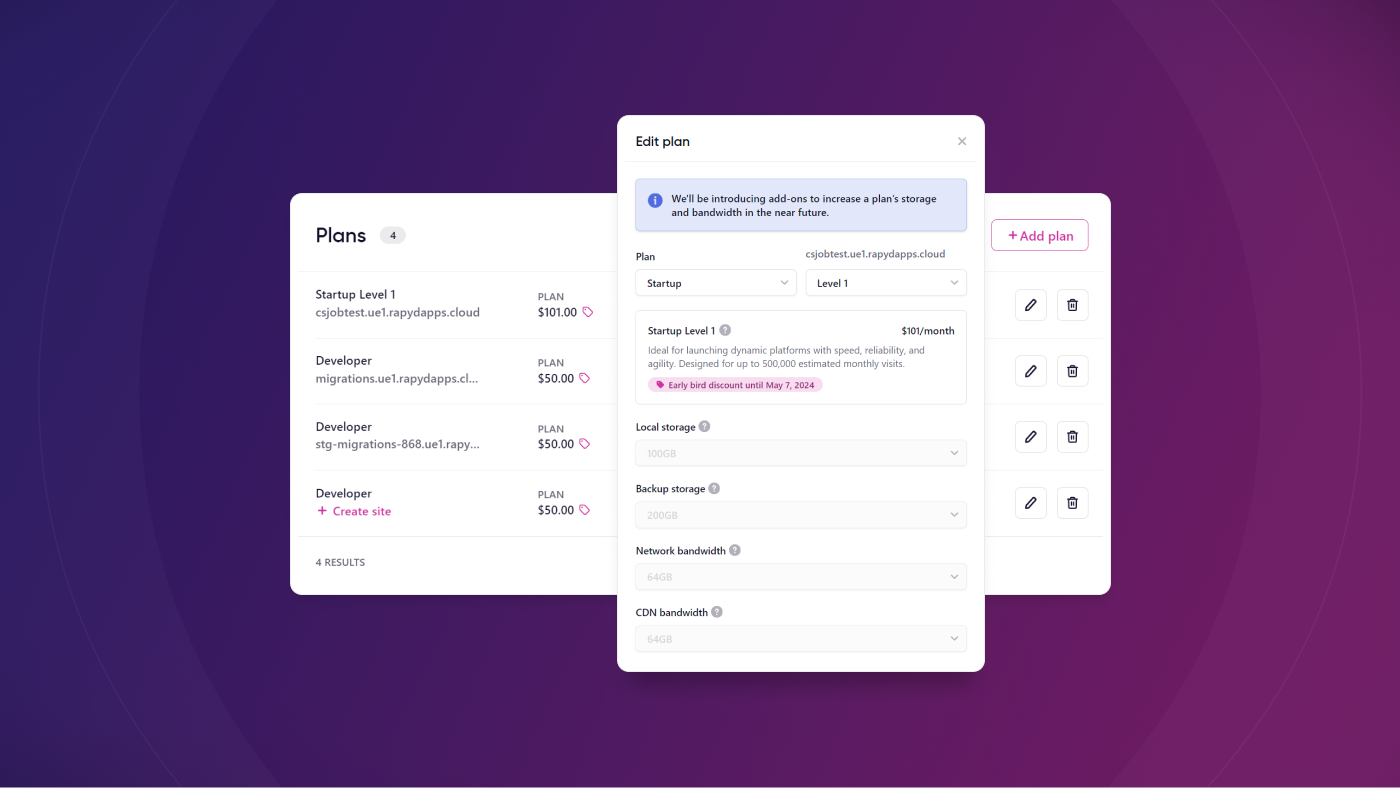
Upgrade and downgrade your plans with our new edit plan feature
Enjoy greater control and flexibility with our Edit plan feature, which allows you to upgrade and downgrade as needed right from the dashboard.
What's New?
We've given you the ability to edit your plan directly from the Rapyd dashboard. This means that you can upgrade to larger plans on your time, and you don't need to contact our support team for any manual intervention. You can also downgrade using this new feature. But be aware that there are some limitations when it comes to downgrading (see below).
Got a big event coming up? Upgrade. Big event ended? Downgrade. Ready to jump up a plan? Upgrade. The reasons and possibilities are endless, and our dashboard's flexibility gives you the control.
How It Works
In Billing > View subscription you can click on the pen icon to start editing your plan. When you click this, a model window will open that lets you select the new plan tier and level, along with a brief description of what the selected plan offers.
In the same modal you can see details about add-ons, which aren't ready at this time, but they'll be ready soon!
An important note about downgrading plans: you cannot downgrade from one plan tier to another. For example, from Startup to Developer, or from Performance to Startup. This is due to technical limitations related to disk space. If you'd like to downgrade, reach out to our support team—we'll be happy to help find a solution.
Learn More
Check out our knowledge base article on Upgrading and Downgrading Plans if you want to learn more about this feature.